Test real corporate inboxes, not just consumer email

Know Where Your Emails Land
Before You Send

Test your email campaigns against real corporate inboxes and security filters. See exactly where your messages end up—inbox, spam, or blocked entirely.

50+
Email Providers
1M+
Tests Run
99%
Uptime

Test against the most common and complex email security systems

How InboxIssue Works

Three simple steps to test your email deliverability

1

Send a Test Email

Send your email to our test addresses. We check it against real corporate inboxes running Google Workspace, Office 365, and major security gateways.

2

We Analyze Every Layer

Our system checks spam filters, link scanners, attachment inspection, and threat protection—the same defenses your recipients use.

3

Get Clear Results

See exactly where your email landed at each provider. Know what triggered filters and get specific recommendations to fix issues.

Everything You Need to Deliver

Comprehensive tools to test, monitor, and improve your email deliverability

Corporate Inbox Testing

Test against real Google Workspace and Office 365 accounts with security policies enabled—not simplified consumer mailboxes.

AI-Powered Analysis

Our AI explains why emails land where they do. Get plain-language insights into what filters flagged and how to fix it.

Developer-Friendly API

Automate testing with our REST API. Run tests from your deployment pipeline or build deliverability checks into your app.

Blacklist Monitoring

Know immediately if your IP or domain gets blocklisted. We check major blacklists continuously and alert you to problems.

Content Analysis

Find the words, links, and patterns that trigger spam filters. See exactly what to change before you send to real recipients.

Scheduled Monitoring

Set up recurring tests to catch deliverability changes automatically. Get notified when your inbox placement drops.

Compare Results

Put two tests side by side to see what changed. Track whether your fixes actually improved deliverability.

Multi-Workspace

Manage multiple brands or clients separately. Each workspace gets its own team members, settings, and test history.

White-Label Reports

Add your logo to deliverability reports for clients. Perfect for agencies and email consultants.

Reputation Monitoring

Track how Google, Microsoft, and blocklists view your sending reputation

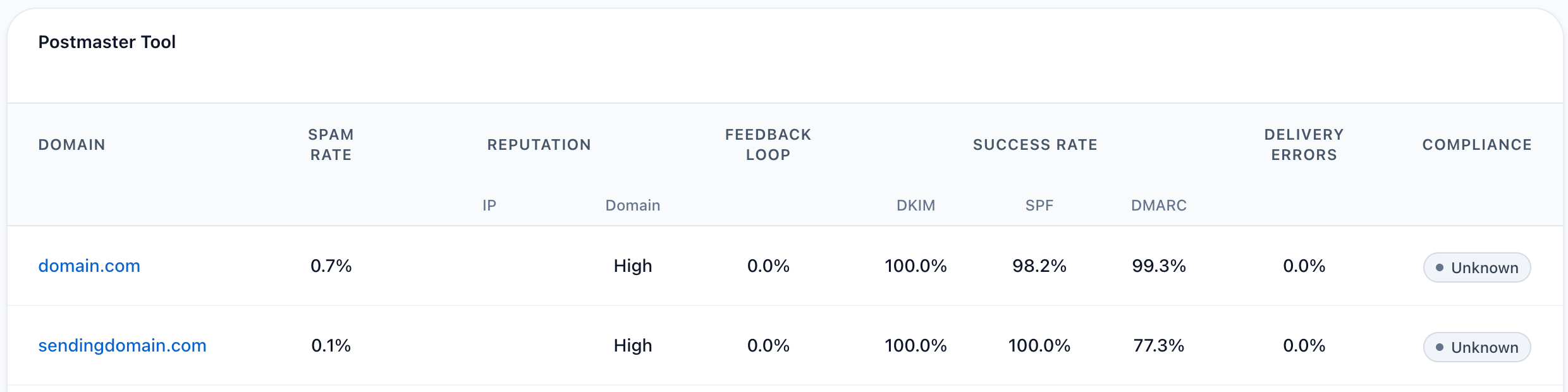
Google Postmaster Tools

See how Gmail rates your sending domain. We connect to both v1 and v2 of Google's Postmaster API to show your reputation in one dashboard.

  • Domain and IP reputation scores
  • Spam complaint rates
  • Email authentication pass rates
  • Delivery error breakdown

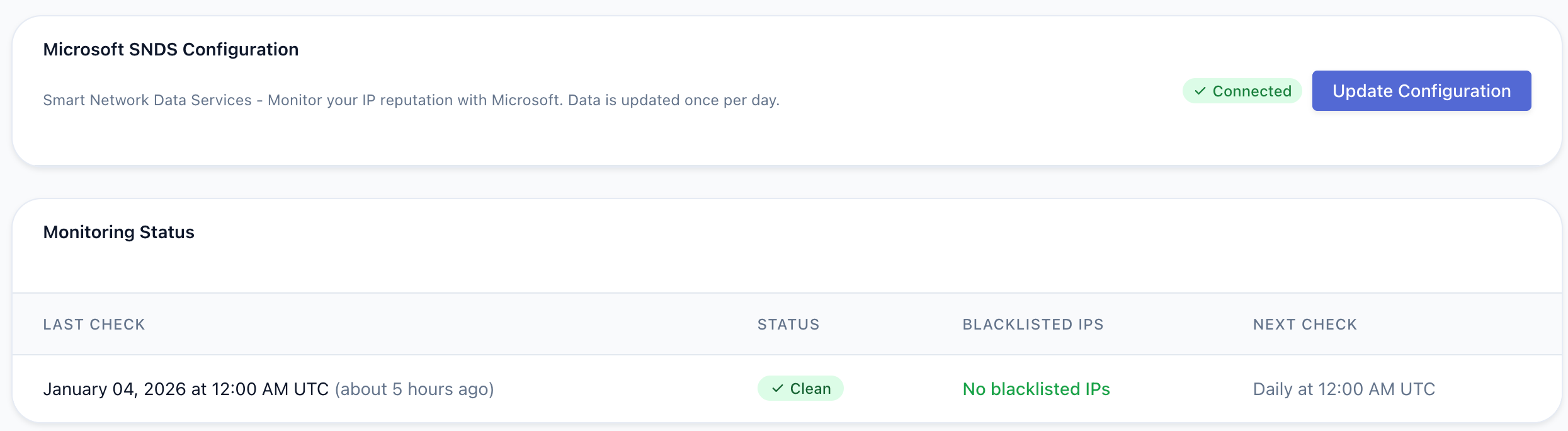
Microsoft SNDS

Understand how Outlook and Office 365 see your sending IPs. Microsoft's Smart Network Data Services tells you if you're being filtered.

  • IP reputation with Microsoft
  • User complaint rates
  • Spam trap detection
  • Filtering status

Blacklist Monitoring

Get alerted immediately if your IP or domain lands on a blocklist. We check continuously so you can act before it impacts delivery.

  • Continuous blocklist checks
  • Instant email alerts
  • 120+ days of history
  • Delisting instructions

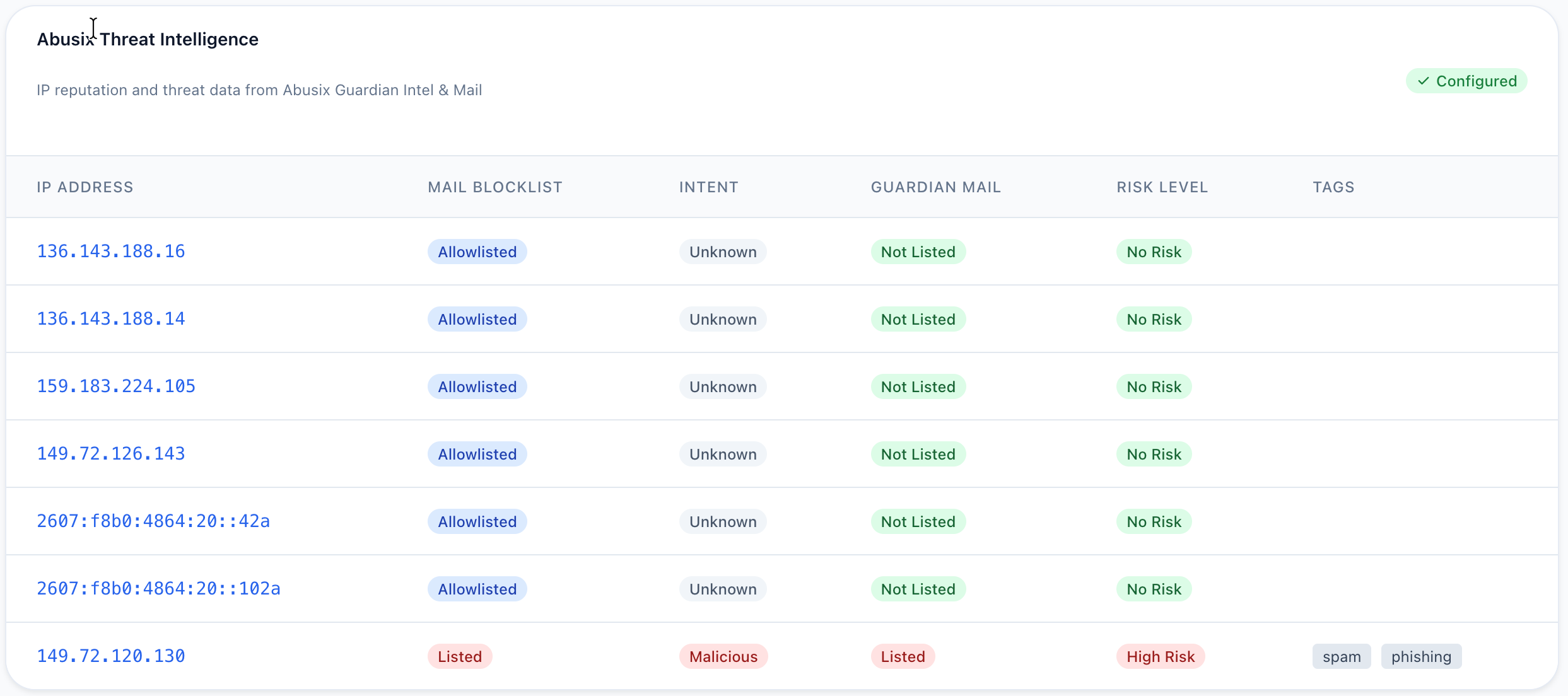
IP Health Dashboard

See your sending IP reputation across multiple data sources in one view. Understand if your IP has been flagged for suspicious activity.

  • Aggregated reputation scores
  • Threat and abuse flags
  • Risk level indicators
  • Auto-detected IPs from tests
Get Started

Catch reputation problems before they hurt your delivery

Visual Reports and Dashboards

Get a clear view of your email performance with our detailed visual reports.

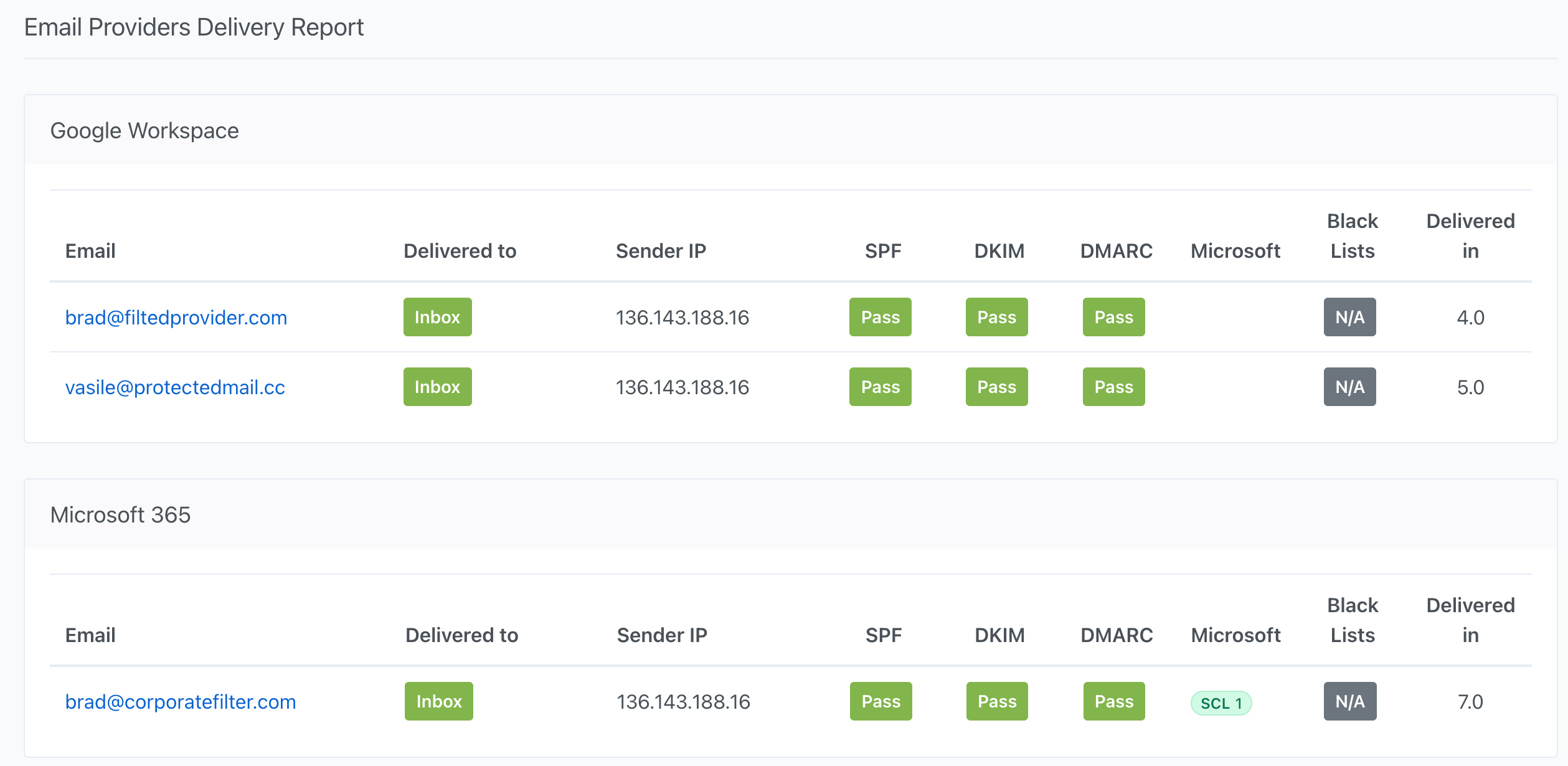
Email Providers Delivery Report

Email Providers Delivery Report

Google Postmaster Tools

Google Postmaster Tools Integration

Microsoft SNDS

Microsoft SNDS Integration

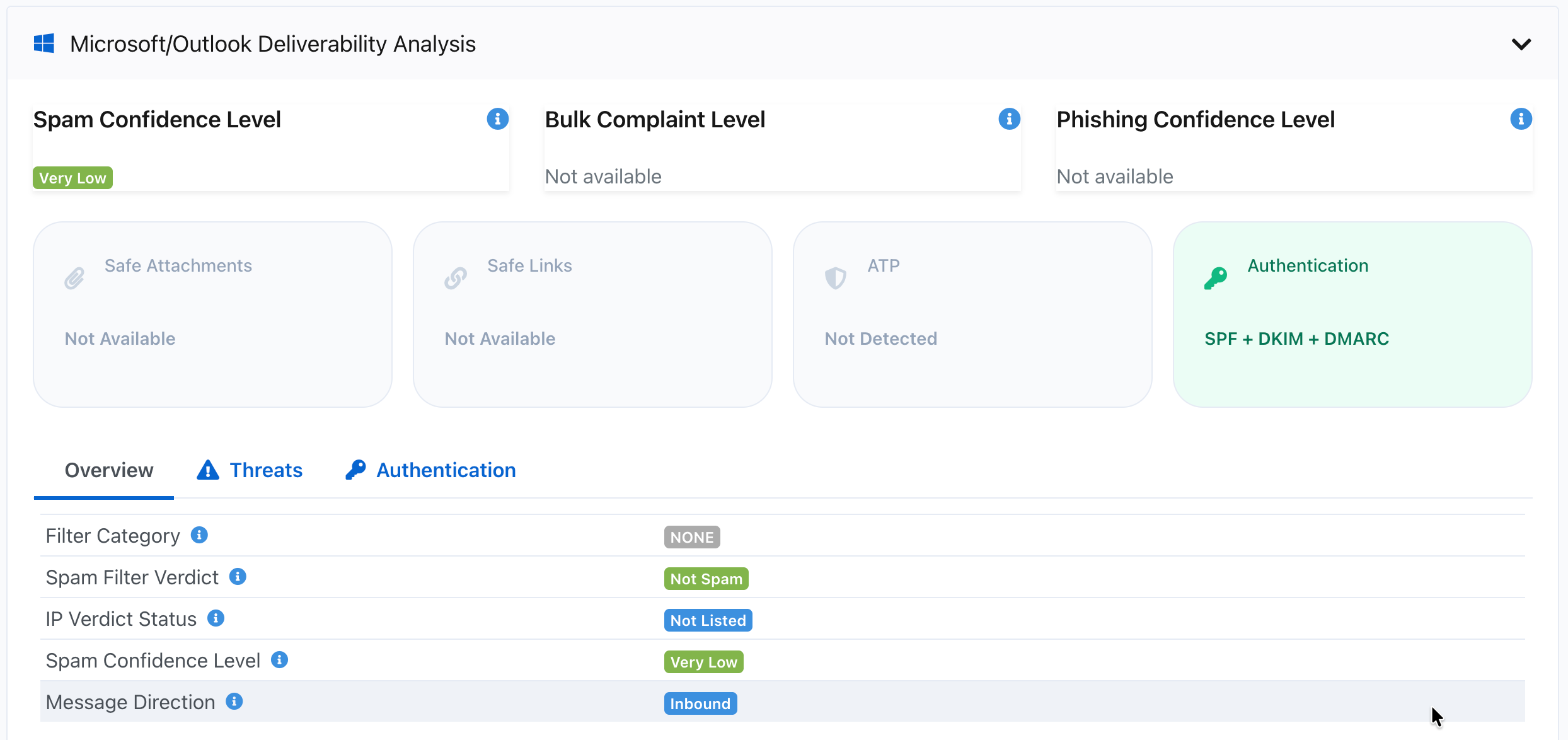
Microsoft Delivery Analysis

Microsoft Delivery Analysis

Abusix Threat Intelligence

Abusix Threat Intelligence

Integrations

Connect InboxIssue to your existing workflow

Slack

Run deliverability tests and receive results directly in Slack. Perfect for teams who live in Slack.

  • /inboxissue command to run tests
  • Real-time test result notifications
  • Channel or DM delivery options
  • Quick access to test history

Webhooks

Receive real-time notifications when tests complete. Integrate with any system that accepts webhooks.

  • Instant test completion alerts
  • Customizable payload options
  • Include raw headers and body
  • Delivery history and retry

Powerful REST API

Our robust API allows you to integrate deliverability testing directly into your email workflows, CI/CD pipelines, and monitoring systems. View full API documentation →

RESTful API

Simple, well-documented endpoints for easy integration

Simple Integration

Create tests and retrieve results with just two API calls

Webhook Support

Get notified instantly when test results are ready

Detailed Reports

Comprehensive analysis of inbox placement and filtering

Example API Request
# Create a new deliverability test
curl -X POST https://app.inboxissue.com/api/v1/external_tests \
  -H "Authorization: Bearer YOUR_API_KEY" \
  -H "Content-Type: application/json" \
  -d '{
    "external_test": {
      "name": "Campaign Test",
      "source": "my_app",
      "metadata": {"campaign_id": "123"}
    },
    "provider_types": ["consumer", "business"]
  }'

# Get test results (use the id from the response)
curl -X GET https://app.inboxissue.com/api/v1/external_tests/12345 \
  -H "Authorization: Bearer YOUR_API_KEY"
Stop Guessing. Start Testing.

Find out where your emails really land before you hit send.

Get Started

Frequently Asked Questions

What makes InboxIssue different from other testing tools?

We test against real corporate mailboxes with security policies enabled. Most tools test consumer inboxes or simplified environments. We show you how emails perform against the same security layers your business recipients actually use—threat scanning, link protection, attachment inspection, and strict spam filters.

Can I test consumer emails too?

Yes. We support both consumer and business mailboxes. But our strength is corporate email testing—if you're sending to companies using Google Workspace or Office 365, you'll get the most value from InboxIssue.

How does the API work?

Send a simple API request to start a test, then poll for results or receive a webhook when it's done. You can run tests from your deployment pipeline, integrate with your email platform, or build deliverability checks into your own application.

What security filters do you test against?

We test against Google Workspace and Office 365 with their security features active—including link scanning (Safe Links), attachment inspection, spam filtering, and email authentication checks. You see how real corporate security policies affect your emails.

Why do corporate emails get filtered differently?

Businesses use additional security layers that consumers don't have. They scan links, block risky attachments, and apply stricter spam rules. An email that reaches a Gmail consumer inbox might get blocked at a Google Workspace account. InboxIssue shows you these differences.